Many people still don’t know what is IPTV. Well, IPTV stands for Internet Protocol Television. It is a way to deliver television channels and video content over an IP network rather than through traditional terrestrial, cable, or satellite TV systems. IPTV can include live TV, video-on-demand (VOD), and time-shifted content.
In simple terms, IPTV lets you watch television through an internet connection.
What Does IPTV Mean?
IPTV means Internet Protocol Television.
The word “Internet Protocol” refers to the networking technology used to send digital data between devices. “Television” refers to the TV channels and video content delivered through that network.
Unlike traditional TV, which relies on an antenna, satellite dish, or cable connection, IPTV uses an IP network to deliver television content.
IPTV in Simple Terms
Think of IPTV as television delivered through a network connection.
Instead of receiving a TV signal through a satellite dish or cable line, your device receives video data through an IP network.
That network may be a managed network operated by a telecommunications provider or another broadband-based delivery system.
How Does IPTV Work?
IPTV works by converting television content into digital data and delivering it across an IP network.
The basic process is:
- A content provider receives or creates television programming.
- The video is encoded into a digital format.
- The IPTV system stores or prepares the content for delivery.
- The content is sent through an IP network.
- Your IPTV device or application receives the stream.
- The device decodes the data and displays the video.
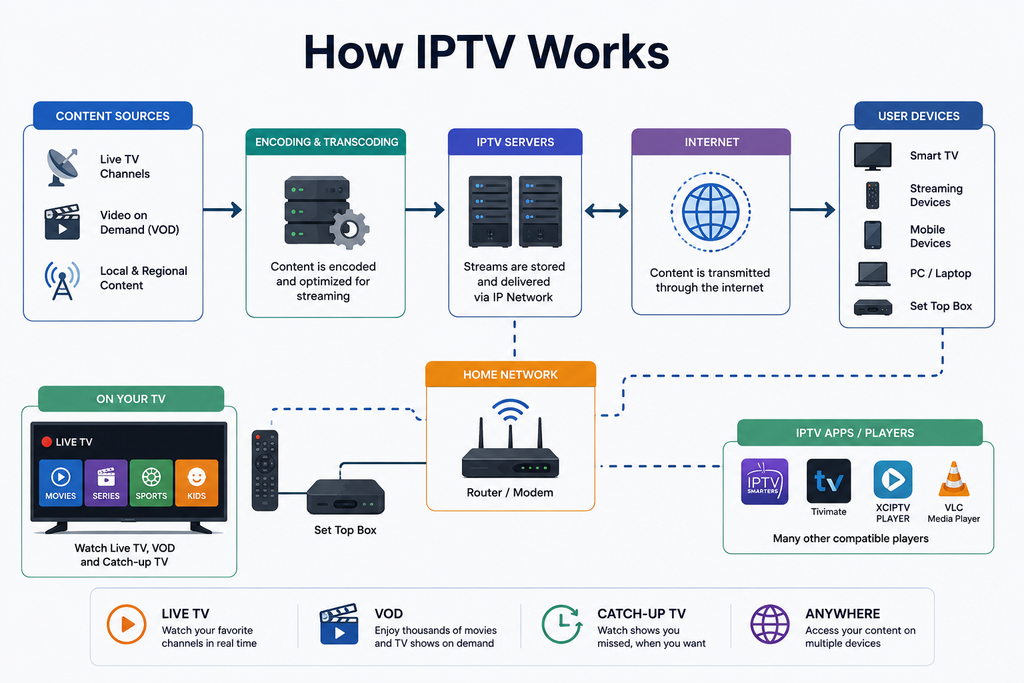
For live television, content can be delivered as a continuous stream. For video-on-demand, the viewer selects specific content and requests it from the service. IPTV systems can also support time-shifted television.
What Do You Need for IPTV?
A typical IPTV setup may require:
- A reliable internet connection
- A compatible television or streaming device
- An IPTV service
- An IPTV application or set-top box
- A subscription or authorized access credentials
The exact setup depends on the IPTV provider and the device being used.
What Can You Watch on IPTV?
An IPTV service may provide different types of television and video content.
Live TV Channels
Live IPTV allows you to watch scheduled television channels as they are broadcast.
This can include:
- News channels
- Sports channels
- Entertainment channels
- Movies
- Documentary channels
- International TV channels
- Local television channels
Video on Demand
IPTV VOD allows users to select movies, shows, or other programs and watch them when they want.
This is different from traditional scheduled television because the viewer chooses the content and viewing time.
Time-Shifted TV
Some IPTV services support catch-up TV or time-shifted programming.
This allows viewers to watch supported programs after their original broadcast time.
IPTV vs Cable TV vs Satellite TV
The biggest difference is the method used to deliver television content.
| Feature | IPTV | Cable TV | Satellite TV |
| Delivery method | IP network | Cable network | Satellite signal |
| Internet required | Usually | Not necessarily | Not necessarily |
| Live TV | Yes | Yes | Yes |
| VOD | Often | Often | Often |
| Smart devices | Often supported | Provider dependent | Provider dependent |
IPTV is therefore not simply a type of television content. It describes how television is delivered.
IPTV vs Streaming Services
IPTV and internet streaming are related, but the terms are not always interchangeable.
Traditional IPTV is commonly associated with television services delivered through an IP network, often by a telecommunications or TV provider. Ofcom describes IPTV as TV channels delivered through the internet, while industry definitions also distinguish IPTV from general internet video services.
Services such as Netflix and YouTube deliver video over the internet. But users normally access individual programs rather than a traditional channel-based IPTV package.
Is Netflix IPTV?
Technically, Netflix uses IP-based internet video delivery. However, people generally use the term IPTV to describe a television service with live channels, VOD, or both.
The distinction is mainly about the type of service and delivery model.
What Devices Support IPTV?
IPTV can work across many connected devices.
Smart TVs
Many modern Smart TVs can run IPTV applications or access IPTV services through supported platforms.
Fire TV and Streaming Devices
Streaming devices can connect to a television and run compatible IPTV applications.
Android TV and Google TV
Android-based television platforms support many IPTV players and media applications.
Smartphones and Tablets
Android and iOS devices can be used for IPTV where the service and application support them.
Computers
Windows and Mac computers can access IPTV through compatible applications or web-based services.
IPTV Set-Top Boxes
Dedicated IPTV set-top boxes can provide a traditional television-style interface.
The International Telecommunication Union also recognizes IPTV terminal devices such as set-top boxes and digital televisions with built-in IPTV functionality.
What Is an IPTV Player?
An IPTV player is an application or device that plays IPTV streams.
The player itself usually does not provide the television channels.
Instead, it may receive authorized content information from an IPTV service and display the available channels or VOD library.
Depending on the provider, access may use credentials, a playlist, or another authentication method.
IPTV Service vs IPTV Player
This distinction is important.
IPTV service: Provides access to television content.
IPTV player: Plays the content on your device.
Installing an IPTV player does not automatically give you access to TV channels.
What Is an M3U Playlist?
An M3U playlist is a file or URL format commonly used to organize multimedia streams.
Some IPTV services provide an M3U URL containing information about available streams.
A compatible IPTV player can read the playlist and display the available channels.
However, an M3U file itself does not determine whether the underlying content is legally authorized.
What Are Xtream Codes?
Xtream Codes is a commonly used authentication and playlist-management method associated with IPTV services.
Depending on the provider, users may receive:
- Username
- Password
- Server URL
These details can then be entered into a compatible IPTV application.
Not every IPTV service uses Xtream Codes.
What Internet Speed Do You Need for IPTV?
The required internet speed depends on the video quality, network conditions, device, and service.
Higher-resolution streams require more bandwidth than standard-definition streams.
For example:
- SD requires less bandwidth.
- HD requires more bandwidth.
- Full HD requires more bandwidth.
- 4K requires substantially more bandwidth.
A stable connection is often more important than simply having a high advertised download speed.
Network congestion, Wi-Fi interference, server capacity, and latency can also affect playback.
What Causes IPTV Buffering?
IPTV buffering occurs when your device cannot receive enough video data to maintain continuous playback.
Common causes include:
- Slow internet connection
- Unstable Wi-Fi
- Network congestion
- High server load
- Poor routing
- Weak wireless signal
- Device performance issues
- Problems with the IPTV service
If buffering occurs frequently, test your internet connection first. Then check whether the problem occurs on other services or only with one IPTV stream.
Is IPTV Legal?
IPTV technology is legal.
The important question is whether a particular provider has the necessary rights to distribute the content it offers.
IPTV itself is simply a method of delivering television over IP networks. Legal concerns can arise when a provider distributes copyrighted channels, movies, or programs without appropriate authorization.
Before subscribing to an IPTV service, check:
- Who operates the service
- Whether the provider identifies its business
- Whether content-distribution rights are clear
- Subscription and refund terms
- Privacy policies
- Payment security
- Applicable laws in your country
A large channel list or low subscription price does not prove that a service is authorized.
What Are the Benefits of IPTV?
IPTV can offer several advantages over traditional television delivery.
Flexible Viewing
IPTV can provide access to television through connected devices rather than requiring a traditional TV connection.
Live and On-Demand Content
Depending on the service, users can access both live channels and VOD content.
Multi-Device Access
Some IPTV services support televisions, streaming devices, smartphones, tablets, and computers.
Interactive Features
IPTV platforms can support features such as electronic program guides, catch-up TV, VOD, and other interactive services. ITU standards describe IPTV systems that support linear TV, VOD, and additional data services.
What Are the Disadvantages of IPTV?
IPTV also has limitations.
Internet Dependency
If your internet connection fails, IPTV may stop working.
Buffering
Poor network conditions can cause buffering or playback interruptions.
Service Reliability
The quality of an IPTV experience depends partly on the provider’s infrastructure.
Device Compatibility
Not every IPTV service works with every Smart TV, streaming device, or application.
Legal and Privacy Risks
Unclear providers may create copyright, payment, or privacy concerns.
How to Choose an IPTV Service
If you are comparing IPTV providers, look beyond the advertised channel count.
Check Content
Make sure the service offers the channels, VOD titles, sports, movies, or international programming you actually want.
Check Device Compatibility
Confirm that the service works with your Smart TV, Fire TV device, Android TV box, smartphone, computer, or other preferred device.
Check Streaming Quality
Look for information about HD, Full HD, or 4K availability.
Check Reliability
Consider buffering, uptime, server performance, and customer support.
Check Pricing
Compare monthly and longer-term plans.
Read the renewal and refund terms before paying.
Check Privacy
Review the provider’s privacy policy and payment practices.
Check Content Rights
Use services that are authorized to distribute the content they offer.
Frequently Asked Questions About IPTV
What is IPTV in simple words?
IPTV is television delivered through an IP network instead of traditional cable, satellite, or terrestrial broadcasting. It can provide live TV, VOD, and time-shifted programming.
Does IPTV require internet?
Most consumer IPTV services require a broadband or IP network connection. The exact network setup depends on the provider.
Can I watch IPTV on a Smart TV?
Yes. Many Smart TVs can support IPTV through compatible applications or built-in IPTV functionality.
Can IPTV work on Firestick?
Yes, where the IPTV service and application support the device.
Is IPTV the same as streaming?
Not exactly. IPTV is a form of television delivery over IP networks. General internet streaming is broader and includes many types of online video services.
Does IPTV include live TV?
Yes. Live television is one of the main forms of IPTV service. IPTV can also include VOD and time-shifted content.
Does IPTV include movies?
Some IPTV services include movies and other VOD content. The available catalog depends on the provider.
Do you need a satellite dish for IPTV?
No. IPTV does not require a satellite dish. It uses an IP network for content delivery.
Is IPTV legal?
IPTV technology is legal. The legality of an individual service depends on whether it has the appropriate rights to distribute its content.
Final Thoughts
IPTV, or Internet Protocol Television, is a method of delivering television and video through IP networks. It can provide live TV, VOD, and time-shifted programming across televisions, streaming devices, computers, and mobile devices.
The key point is simple: IPTV is the delivery method, not a guarantee that every IPTV provider is legitimate.
When choosing an IPTV service, focus on content, reliability, device compatibility, privacy, pricing, and content rights. That will help you find a service that is both suitable and trustworthy.

One Response